Who Owns Your Company's Memory?
AI memory saves you re-explaining context, but where it lives matters. How BYOC and BYOVPC keep company memory in your own cloud, and what to ask vendors.

TL;DR
Your company should own its AI memory: the decisions, customer history and reasoning an assistant learns should live in your own cloud, where you control access. Export helps, but it isn’t enough. A BYOC or BYOVPC deployment keeps the memory store in your environment while a vendor still runs the service.
Why AI memory matters
Having to explain the same thing to an AI every time gets old. You told it why a design wouldn’t work, and in the next conversation it suggests the same design again. Before you can get anywhere, you have to fill in the background.
Memory helps with that. An assistant can remember a decision and the reasoning behind it, or pick up a customer problem without suggesting everything you’ve already tried.
ChatGPT can carry preferences and useful context across chats (ChatGPT documentation). Claude has memory too, with controls to edit it and take a copy with you (Claude documentation). These features save you from having to keep reminding an assistant what it should already know.
There can be a cost benefit as well. In its own 2025 evaluation on the LoCoMo benchmark, Mem0 reported over 90% lower token costs than sending the full conversation history to the model (Mem0 research paper). That’s a result from one vendor’s test, but it gives a concrete example of the savings possible when a system retrieves the relevant history.
Who controls an AI assistant’s memory?
The part I find uncomfortable is how much an assistant can come to know about you while its memory lives in a system someone else controls.
Imagine if your own memory worked that way. Everything you’d learned was held in another company’s account. You could recall it through their software, but they decided where it was kept and how you could use it. It would be a strange arrangement for something that came from your own life.
Why company memory is sensitive
A business has plenty of memories it would want to keep close. Why did a customer nearly leave, and what did the team agree to do about it? An engineering decision might look arbitrary until you know about the outage that led to it. That background can save the next person from making the same mistake.
Put enough of it together and you have a detailed account of how the company operates. A memory system becomes more useful as it makes those connections, and more sensitive for exactly the same reason.
Being able to export a copy is helpful. You also need to know what happens to the memory while it’s in use, and where it travels.
If your security team requires that information to stay in your own infrastructure, a service that can’t run there may never make it into production. For that buyer, deployment can be a dealbreaker.
What BYOC and BYOVPC mean
ClickHouse and Redpanda offer a useful precedent. ClickHouse’s BYOC model runs the data plane in your cloud account while ClickHouse operates the management layer (ClickHouse architecture). Redpanda does something similar for streaming, and its BYOVPC option lets you supply and manage the network infrastructure too (Redpanda deployment models). You get a managed service with the data kept in your environment.
I’d want the same arrangement for a system that remembers how my company works.
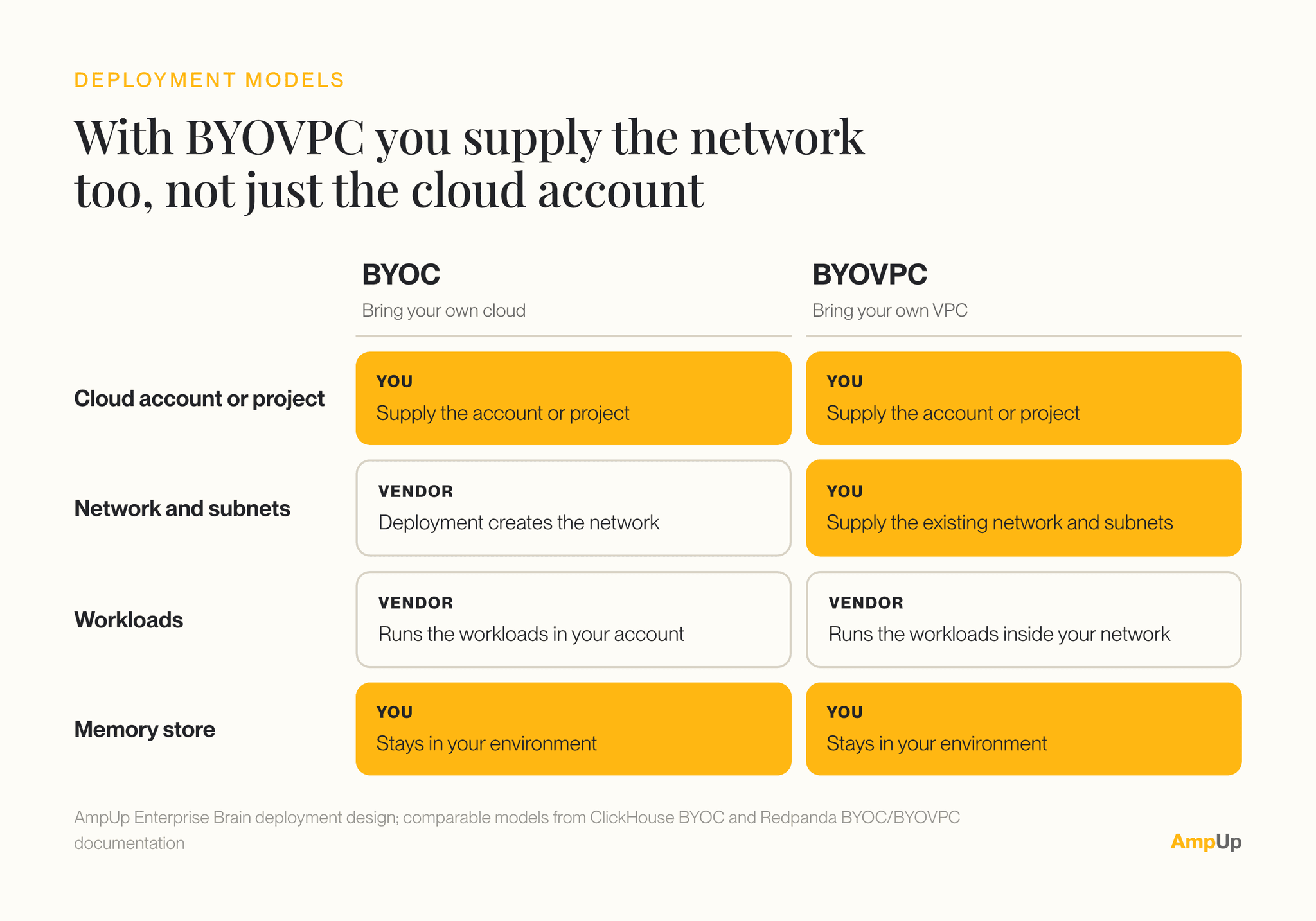
Which AI memory tools can run in your own cloud?
There are already private deployment options in the memory market. Zep advertises BYOC inside a customer VPC. Mem0 has an on-premises option, and Supermemory offers self-hosting. The details are worth checking, and the questions below are where I’d start.
| Vendor-hosted | BYOC | BYOVPC | Self-hosted | |
|---|---|---|---|---|
| Cloud account | Vendor’s | Yours | Yours | Yours |
| Network and subnets | Vendor’s | Created by the vendor’s deployment | Yours, existing | Yours |
| Who runs the service | Vendor | Vendor, in your account | Vendor, in your network | Your team |
| Where the memory lives | Vendor’s environment | Your environment | Your environment | Your environment |
Based on ClickHouse and Redpanda deployment documentation.
Questions to ask an AI memory vendor
- Who can read the memory while it’s in use?
- Does any of it go to services your company hasn’t approved?
- What can the vendor access, and can you withdraw that access?
- How much of the day-to-day operation will your team have to take on?
- Which model and embedding services receive content, and through which processing paths?
How AmpUp Enterprise Brain keeps memory in your cloud
We build sales execution, so the memory we care about first is deal memory: Enterprise Brain ships sales and engineering schemas today.
AmpUp Enterprise Brain, the learning context layer for enterprise agents (in private preview), has a native BYOC and BYOVPC design that spells out who supplies what:
- Bring Your Own Cloud: You supply the cloud account or project. Enterprise Brain’s deployment model creates the network and runs the workloads there.
- Bring Your Own VPC: You supply the existing network and subnets, and Enterprise Brain’s workloads run inside them.
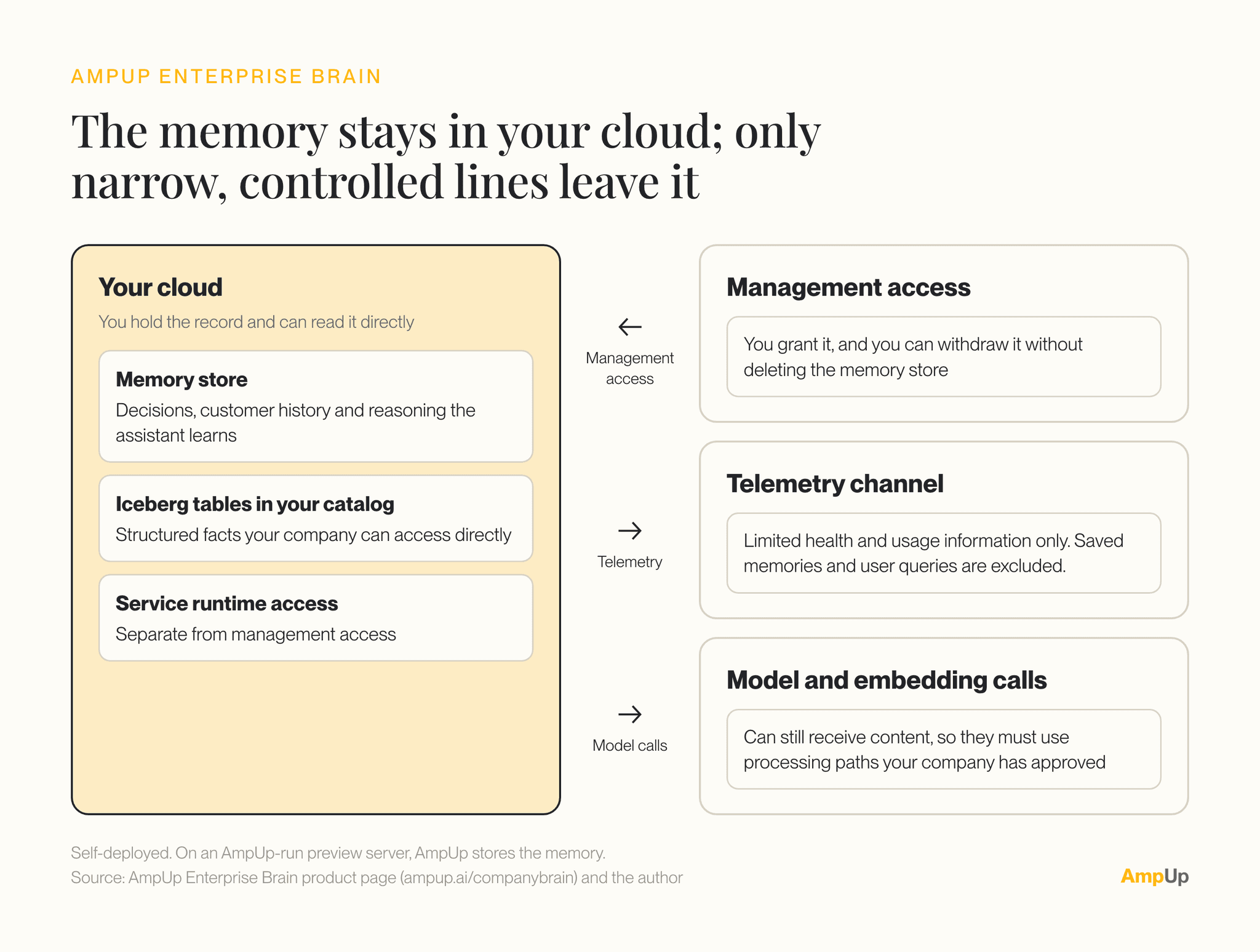
Enterprise Brain stores the memory in your environment, as Iceberg tables in your own catalog: Snowflake or Google Cloud today (AWS and Databricks aren’t supported yet), or a laptop.
Snowflake or BigQuery can query the same tables directly, and permissions follow the source. In Snowflake, nothing is sent to AmpUp. If you stop using it, the tables stay in your catalog.
One caveat during the preview: a team can also use a server AmpUp runs, and in that case AmpUp stores that team’s memory.
You grant the access used to manage the deployment. It’s separate from the access the service needs to run, which lets you withdraw management access without deleting the memory store. The management layer receives limited health and usage information through its telemetry channel; saved memories and user queries are excluded.
What about model calls?
Model calls need their own check. Even with memory stored in your cloud, an external model or embedding service can still receive content. Every time a memory is written or searched, the text may be turned into an embedding by some service, and that service sees the text. Those calls need to use processing paths your company has approved. In Enterprise Brain, model calls go through OpenRouter by default, and a direct backend can keep them inside your cloud. (We’ve had to think the same way about capture: see why we built our own notetaker.)
Frequently asked questions
Who owns the memory an AI assistant builds about my company?
That depends on where it’s stored. If the memory lives in a vendor’s account, the vendor decides where it’s kept and how you can use it, even if you can export a copy. If it lives in your own cloud, your company holds the record and decides which tools can read it.
What’s the difference between BYOC and BYOVPC?
With BYOC (bring your own cloud), you supply the cloud account and the vendor’s deployment creates the network and runs the workloads in it. With BYOVPC (bring your own VPC), you also supply the existing network and subnets, and the vendor’s workloads run inside them.
Is exporting my AI memory enough?
Export is helpful, but it only covers leaving. You also need to know how the memory is read and where it goes while it’s in use.
Does keeping memory in my cloud keep all my data in my cloud?
Not on its own. Model and embedding calls can still send content out, so check where those calls go.
Keep the history you built
A company should be able to choose a different assistant and keep the history it spent years building. With memory under its control, it gets to decide which tools can use that history next.
If you’re weighing where your company’s memory should live, talk to us. For more on how we build, see our infrastructure stack.

Book a demo with us
See how AmpUp turns every call into a coaching opportunity.
Written by

Rahul Balakavi
Co-Founder, AmpUp
Rahul is the co-founder of AmpUp. He leads engineering and product, bringing deep expertise in building AI-powered platforms that turn sales data into actionable intelligence.
Stay up to date with AmpUp
Follow AmpUp on LinkedInFollow us on LinkedIn for the latest on AI-powered revenue intelligence.