Why We Built Our Own Meeting Notetaker (And Why It's Not Really About Notes)
Bots get speaker labels but sit in the meeting; desktop capture is invisible but can't tell who spoke. How we built a notetaker that does both.

Every meeting generates signal. What you can extract depends entirely on how you capture it.

A bot with video catches facial expressions. Audio-only bots give you tone, hesitation, and speaker labels. Desktop capture is invisible but can’t tell you who said what. And a post-call voice debrief captures the rep’s perspective, context no recording provides.
Gong built this category and proved meeting intelligence changes revenue outcomes. But Gong is optimized for one point on this spectrum: a bot in the meeting. Desktop notetakers like Granola and Fathom capture invisibly but aren’t built to extract sales intelligence.
No notetaker today is optimized for sales intelligence across the full spectrum. That’s why we built our own.
The Desktop Diarization Problem
Bot-based tools get speaker labels from the platform. The cost: a bot in the room, IT blocks, social friction. Desktop capture is invisible and works with anything. The cost: no speaker metadata.
We wanted both: invisible capture and speaker identification. Plus something neither offers: live coaching during the call.

Voice Fingerprints: Speaker ID Without Platform Metadata
Instead of relying on the meeting platform to tell us who’s talking, we identify speakers by their voice. The system uses ECAPA-TDNN, the same family of models used in voice authentication (banking phone lines, smart speakers). A few seconds of audio produces a compact voice signature. Same person, similar signatures. Different person, far apart.
Five labeled clips per speaker gets to 95% accuracy. Validated across dozens of calls. The signature converges fast.
Three things that make this reliable:
- Overlap detection. Two people talking at once produces a blended, useless signature. We detect and exclude mixed segments.
- Confidence gating. Strong match: assign name. Weak match: “Unknown.” Too close to call: flag for review. False positives are worse than unknowns.
- Active learning. The system surfaces the segments where a label would help most, not random ones.

Voice signatures accumulate across calls. The second time you meet someone, the system knows their voice. Bot-based tools don’t know that “Sarah” on today’s Zoom is the same person from last week’s Google Meet. We do. And it works for phone calls, dial-in participants, conference rooms, anywhere platform metadata is useless.
When You Can’t Record At All
Here’s something no notetaker blog talks about: many conversations legally can’t be recorded.
California, Illinois, and most EU countries require two-party consent. Asking “mind if my AI records this?” in a high-stakes sales conversation changes the entire dynamic. Some prospects say no. Some internal conversations (legal, HR, board) are off-limits by policy.
For these conversations, AmpUp offers a post-call voice debrief. The rep talks to an AI agent that asks structured questions: “What were the key objections? Did you discuss timeline? Who else needs to be involved?” The agent captures the rep’s perspective while memory is fresh, typically within 60 seconds of hanging up.
No recording. No consent issue. The intelligence still flows into the deal.

For enterprise sales teams operating across jurisdictions, this is often the only compliant way to capture meeting intelligence.
Live Coaching: Augment, Not Disrupt
The rep is on a Zoom call. The AmpUp pill floats in the corner, recording. When the coaching engine detects a critical moment, a small card appears above the pill: the suggestion, the reasoning, gone in seconds. The rep glances, absorbs, keeps talking. No window switching. No tab juggling.

The hardest UX problem isn’t generating good suggestions. It’s knowing when to show them.
A coaching card that appears while the rep is mid-sentence is worse than no coaching at all. The rep glances at it, loses their train of thought, the prospect notices. After a few times, the rep stops looking. The feature is dead.
Three design principles:
1. Time it to the other party’s turn. Suggestions appear when the prospect is speaking, the natural moment when the rep is listening and can glance at a screen.
2. Critical moments only. The engine filters for high-priority signals: competitor mentions, buying signals, pricing objections, commitment language. Generic advice never surfaces.
3. Ambient by default, active on demand. A subtle indicator dot when a suggestion is ready. The rep expands it at a natural pause. Full pane available for reps who want it.

The Closed Loop
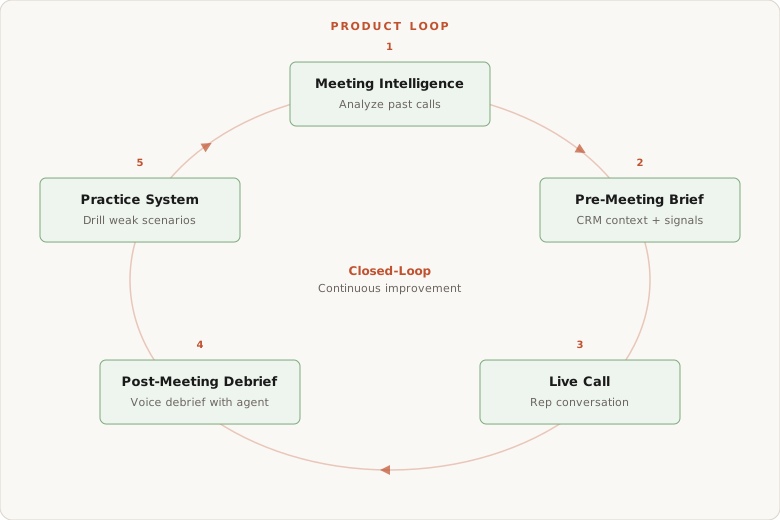
A notetaker records a conversation. AmpUp uses it as fuel for a system that makes every future call better.
For the rep
Before: Pre-meeting brief with deal context, past objections, stakeholder map. No 20-minute prep.
During: Live coaching with deal-specific suggestions. Objectives that track themselves.
After: Post-call debrief extracts signals and updates CRM. No forms.
For the sales leader
Talk ratios per stakeholder. Not just “you talked 70%” but “you talked over the VP three times during pricing.”
Deal health from engagement trends. Champion’s participation dropping over three calls means risk, regardless of what the rep’s pipeline says.
Coaching gaps across the team. Which reps struggle with which objection types. Where the playbook is working and where it isn’t.
For the organization
Everything compounds. One rep labels a voice, every rep’s app recognizes that person. Every call makes the coaching engine smarter. A top rep handles an objection well Monday, every rep drills on it by afternoon.
The Comparison
| Desktop Notetakers | Bot-Based Tools | AmpUp | |
|---|---|---|---|
| Invisible (no bot) | Yes | No | Yes |
| Works with any audio | Yes | No | Yes |
| Speaker identification | No | Yes (platform metadata) | Yes (voice signatures) |
| Cross-call speaker recognition | No | Limited | Yes |
| Works without recording consent | No | No | Yes (post-call debrief) |
| Live coaching during call | No | No | Yes |
| CRM-aware suggestions | No | No | Yes |
| Deal intelligence from calls | No | Partial | Yes |
| Feeds into practice system | No | No | Yes |
Where the Data Takes Us
Voice fingerprinting is one piece of a larger thesis: meeting signals predict deal outcomes better than rep self-reports.
Pipeline forecasting today relies on reps updating a Salesforce stage field, a judgment call filtered through optimism bias. The actual signals sit in recordings nobody reviews.
Signal-based deal scoring. Champion talk ratio dropped 40% over three calls? Risk. A new executive asking implementation questions? Buying signal. Detectable from data we already collect.
Auto-generated coaching from outcomes. We’re exploring reinforcement learning to optimize suggestions based on what actually correlates with deals advancing, not just the playbook.
Deeper vocal signals. Sentiment from voice modulation. Engagement from turn-taking patterns. Excitement spikes on features, flat tone during pricing.
The notetaker captures raw signal. The intelligence layer extracts meaning. The coaching system acts on it. Outcomes feed back into better extraction.
Build With AmpUp
Read the complete engineering series:
Or book a demo and see the in-call assistant live.
Frequently Asked Questions
Q: Does the desktop app work with all meeting platforms?
Yes. System audio capture, no bot. Zoom, Meet, Teams, WebEx, phone calls, anything playing through your computer.
Q: How does speaker identification handle accents or noise?
The model was trained across dozens of languages and recording conditions. We reject noisy clips from training. 95%+ accuracy on standard video call quality.
Q: What about voice fingerprint privacy?
Org-scoped, encrypted at rest, deletable on demand, opt-in per organization. The signature is a numeric vector that can’t reconstruct audio or identify someone outside AmpUp.
Q: Can I use the notetaker without the rest of AmpUp?
You could, but you’d be missing the point. The real value comes from the coaching engine and the feedback loop into practice. Using AmpUp’s notetaker without the intelligence layer is like buying a Tesla for the cupholders.

Book a demo with us
See how AmpUp turns every call into a coaching opportunity.
Written by

Rahul Balakavi
Co-Founder, AmpUp
Rahul is the co-founder of AmpUp. He leads engineering and product, bringing deep expertise in building AI-powered platforms that turn sales data into actionable intelligence.
Stay up to date with AmpUp
Follow AmpUp on LinkedInFollow us on LinkedIn for the latest on AI-powered revenue intelligence.