The short version. For technical training, the best authoring tool turns your manuals and procedures into accurate, assessable courses and exports to the standard your LMS speaks. Articulate 360 and Adobe Captivate lead on depth, iSpring Suite on PowerPoint workflows, and dominKnow | ONE on content reuse and on-premises hosting. AmpUp builds from your own material and exports SCORM 1.2.
A technical training team has a different problem from a corporate L&D team. The source is a maintenance manual, a set of task cards or a service bulletin, not a slide deck about company values. The output has to be accurate to a specific revision, assessable, and accepted by whatever LMS the organization already runs. Some of the learners work on a hangar floor or a plant floor with patchy connectivity. Some of the content may be export-controlled.
This roundup compares the authoring tools that come up most for that job, on the criteria that matter for it: standards out, offline delivery, hosting options, AI features and price. Every vendor claim comes from that vendor’s own pages, checked on November 5, 2026, and linked inline; the one exception, Gomo, is flagged where it appears. Where we could not find a claim on the vendor’s site, the table says “not stated”, which means we did not find it, not that the product cannot do it. One disclosure: AmpUp is our product. We have placed it where it honestly fits, and it is designed to work next to the tools below rather than instead of them.
The short version: comparison table
Ten authoring tools compared for technical training, as each vendor describes them, in two tables so they stay readable on a phone; five more AI-first tools follow in the AI section. Prices are the ones published on the vendor’s own pricing page; where none was published, we say so rather than quote a reseller’s estimate.
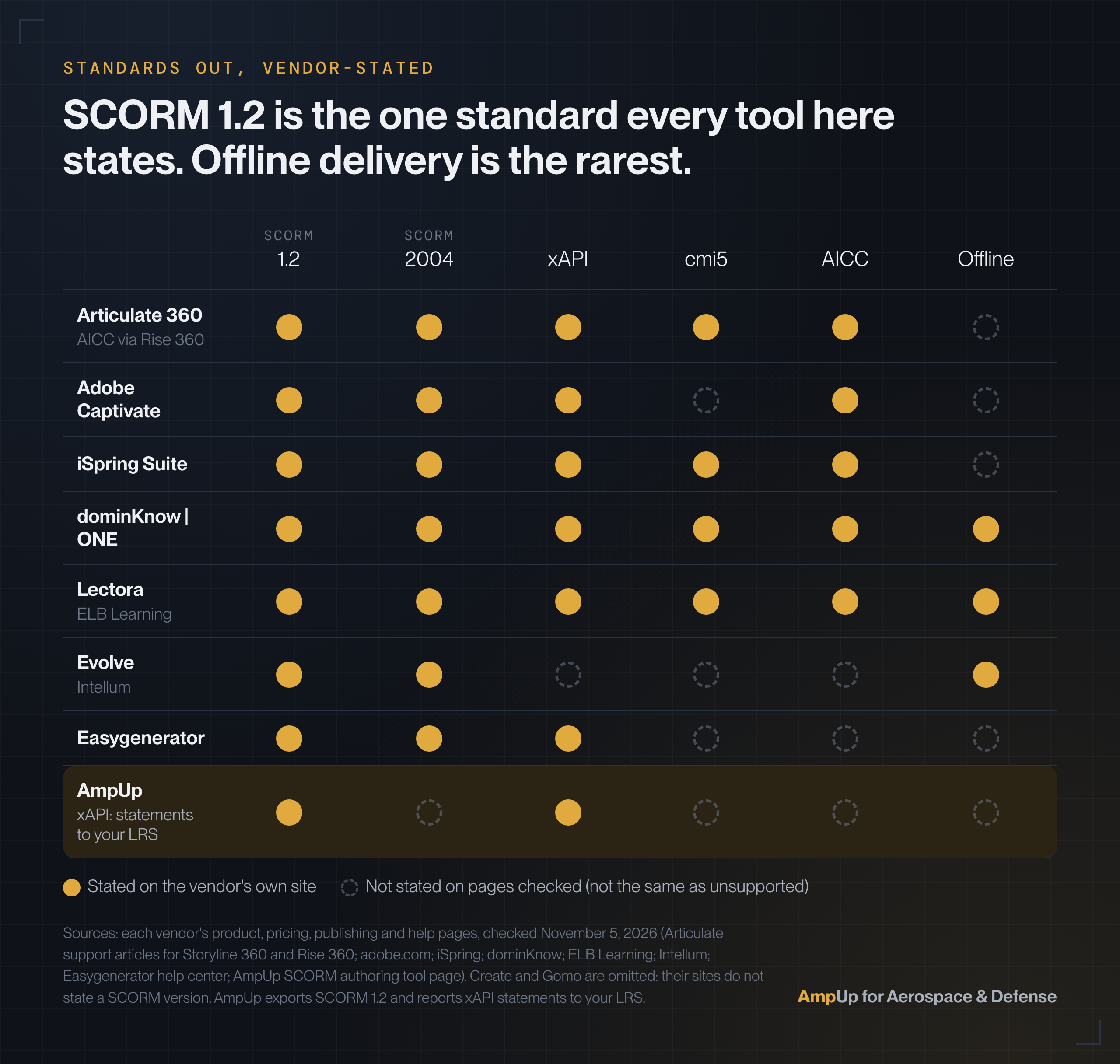
Standards and offline delivery
| Tool | Standards out (vendor-stated) | Offline |
|---|---|---|
| Articulate 360 | SCORM 1.2, 2004, xAPI, cmi5; AICC via Rise 360 | Not stated |
| Adobe Captivate | SCORM 1.2, 2004, xAPI, AICC | Not stated |
| iSpring Suite | SCORM 1.2, 2004, xAPI, cmi5, AICC | Not stated |
| dominKnow | ONE | SCORM 1.2, 2004, xAPI, cmi5, AICC | Yes (desktop or LMS app) |
| Lectora | SCORM 1.2, 2004, xAPI, cmi5, AICC | Yes (offline publishing) |
| Create (Confirm) | SCORM (version not stated) | Not stated |
| Evolve (Intellum) | SCORM 1.2, 2004 | Yes (offline publishing) |
| Easygenerator | SCORM 1.2, 2004, xAPI | Not stated |
| Gomo | SCORM (version not stated on its site) | Not stated |
| AmpUp for Aerospace & Defense | SCORM 1.2 out and in; xAPI statements to your LRS | Not stated |
AI features, price and best fit
| Tool | AI features | Published price | Best for |
|---|---|---|---|
| Articulate 360 | Drafts from a prompt or document, quizzes, AI voices | $1,749 per seat per year (list) | Teams already on Articulate |
| Adobe Captivate | Firefly images, AI avatars and voices | By region on adobe.com | Software simulations |
| iSpring Suite | Course drafts, quiz questions (Suite AI) | $970 per author per year | PowerPoint-based teams |
| dominKnow | ONE | AI Translator, AI Question Generator | Quote, per author | Reuse and on-premises hosting |
| Lectora | AI Course Wizard first drafts | Not published | Desktop authoring with accessibility checks |
| Create (Confirm) | Outlines from PDFs, AI translation | Not published | Updating and translating at scale |
| Evolve (Intellum) | Drafts from documents, videos and manuals | From $49 per user per month | Enterprise responsive courses |
| Easygenerator | Course builder, AI editor, images | Pro €1,299 per year | Experts writing their own courses |
| Gomo | Auto-translation (OpenAI) | Not published | Responsive courses on any device |
| AmpUp for Aerospace & Defense | Drafts from your manuals, narration, scenario practice | Not published | Courses from your own material, measured after delivery |
Sources: each vendor’s product, pricing and help pages, linked in the sections below, checked November 5, 2026. Easygenerator prices are in euros as shown on its pricing page. Features change between releases; confirm anything decisive with the vendor in writing.
Authoring tool, LMS or work-instruction tool: which do you need?
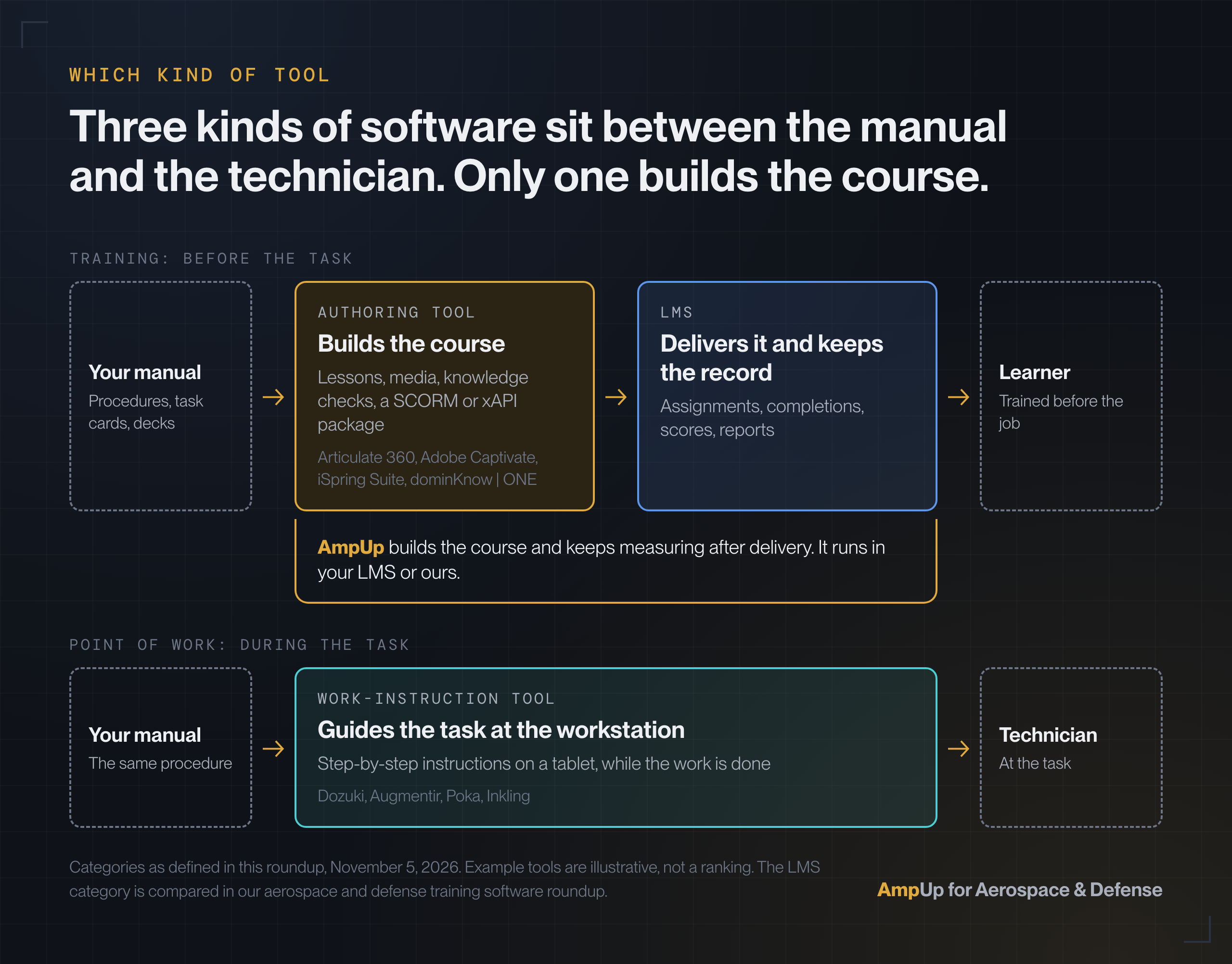
Three kinds of software get called “training tools”, and buying the wrong one is the most expensive mistake on this list.
An authoring tool builds the course. It takes source material and produces a package: lessons, media, knowledge checks and the tracking code that reports results. Everything ranked in this post is an authoring tool. On its own, an authoring tool does not assign training to people or keep their records.
An LMS delivers the course and keeps the record. It assigns training by role, launches the package, stores completions and scores, and runs the reports an auditor or a customer asks for. If that is the gap, our roundup of aerospace and defense training software covers LMS, training management and quality-system platforms. The two posts are counterparts: this one stays on authoring.
A work-instruction or connected-worker tool guides the task at the point of work. Products such as Dozuki, Augmentir, Poka and Inkling put step-by-step instructions on a tablet at the workstation. They are not built to produce a course with an assessment for an LMS; they are built so the technician does not need to remember step 14. Some plants run one next to an LMS, and the same procedure often feeds both.
How we chose
We started from the job a technical training team does, not from a general feature list. Seven criteria, in roughly the order they decide a purchase:
- Builds from source documents. Can it start from a manual, an SOP or an existing deck, or does every course start from a blank page?
- Standards out. Which of SCORM 1.2, SCORM 2004, xAPI, cmi5 and AICC the vendor states it publishes to.
- Offline or disconnected delivery. Whether the vendor states a way to run courses without a live connection, for hangars, ramps and plant floors.
- Hosting options. On-premises, single-tenant or desktop authoring, for teams handling export-controlled content. Whether a deployment is acceptable for ITAR data is your call; our ITAR training guide lists the questions to ask.
- Assessment beyond a quiz. Scenarios, branching, simulations and practice that pushes back.
- Translation. Technical content often ships to multilingual networks of installers and service partners.
- Price transparency. Whether a team can budget from the vendor’s own page.
We did not test each product hands-on for this post. The comparison is built from what vendors publish, which is what an evaluation shortlist is usually built from too. We left out Composica (no current vendor page found) and tools that are not authoring tools.
Best SCORM authoring tool for technical training teams
For most technical training teams the shortlist is Articulate 360, Adobe Captivate, iSpring Suite and dominKnow | ONE: all four state SCORM 1.2, SCORM 2004 and xAPI export, and each wins a different situation. There is no single best tool, because teams start from different places. Grouped by the situation each tool fits best:
Best for teams already on Articulate: Articulate 360
Articulate 360 bundles Storyline (slide-based, with triggers, variables and software simulations) and Rise (responsive, browser-based). Storyline 360 is SCORM conformant from SCORM 1.2 through SCORM 2004 4th edition, plus xAPI and cmi5, and Rise 360 exports to xAPI, SCORM 2004, SCORM 1.2, AICC and cmi5. Its AI Assistant turns “a simple prompt or document into an outline, lesson, or full course draft”, builds quizzes and knowledge checks, and adds AI voices. The pricing page lists the 360 AI plan at $1,749 per seat per year and Frontline, for teams outside L&D, from $500 per year. The installed base is the real argument: templates, habits and a large community of designers.
Best for complex simulations and software training: Adobe Captivate
Adobe Captivate is built for interactive simulations and hands-on software training, and the current release is responsive by default. Adobe states it supports SCORM 1.2, SCORM 2004, AICC and xAPI, with Firefly image generation, AI avatars and AI voices for narration. It installs on your own machine, which matters to teams that keep project files inside their network. Adobe prices it by region, so check adobe.com for your country.
Best for PowerPoint-based teams: iSpring Suite
If your subject-matter experts already build in PowerPoint, iSpring Suite works inside it and converts decks into courses with quizzes. iSpring states it supports SCORM 1.2, SCORM 2004, AICC, xAPI and cmi5. The pricing page lists iSpring Suite at $970, iSpring Suite AI at $1,290 and iSpring Cloud AI at $720, each per author per year. Suite AI adds course drafts and quiz generation.
Best for content reuse and on-premises hosting: dominKnow | ONE
dominKnow | ONE is one platform to create and manage content, with learning topics that can be shared across multiple projects, so a procedure maintained once can appear in several courses. Its publishing page lists SCORM 1.2, SCORM 2004, AICC, xAPI and cmi5, and publishing to an intranet, desktop or LMS mobile app “to access from anywhere online or offline”. Its pricing page is the clearest on hosting in this roundup: SaaS or on-premises, a private single-tenant install, and an on-premises Enterprise option that “can also be installed behind your firewall.” Pricing is by quote, per author, with learners free.
Best for a desktop tool with offline publishing: Lectora
Lectora, from ELB Learning, comes in desktop and online versions. It publishes to AICC, SCORM (1.1, 1.2 and 2004), cmi5 and xAPI, or “for offline use”, and its AI Course Wizard drafts a first version from a topic. ELB’s feature list adds library objects for content reuse and WCAG 2.0 AA support with an accessibility checker, which matters when courses go to customers and public-sector programs. ELB did not publish a price on the pages we checked.
Best for responsive, collaborative authoring at scale: Create, Evolve, Easygenerator and Gomo
These four are web-based and built for many authors working on many courses. Create (formerly Elucidat, now part of Confirm) focuses on building, updating and translating training across locations, with AI outlines from PDFs and SCORM delivery; it does not publish a price. Evolve, from Intellum, exports SCORM 1.2 and SCORM 2004, lists offline publishing, and its Creator Agent drafts courses from documents, videos and manuals; plans start at $49 per user per month billed annually. Easygenerator publishes SCORM 1.2, SCORM 2004 (4th edition) and xAPI and is built for subject-matter experts to write their own courses; its pricing page shows Pro at €1,299 per year and Team at €6,495 per year from five authors. Gomo states that responsive output comes as standard, offers SCORM delivery and auto-translation powered by OpenAI. Its help center, as indexed by search (the pages did not load for us), lists SCORM 1.2, SCORM 2004 and xAPI publishing; confirm the versions with Gomo. We found no published price.
Best for building from your own technical material, with practice and measurement after the course: AmpUp for Aerospace & Defense
AmpUp for Aerospace & Defense starts from what a training team already owns: maintenance manuals, task cards, SOPs, slide decks and recorded sessions. It builds narrated courses with rubric-scored knowledge checks and scenario practice, for your experts to review and sign off. Every course exports as a self-contained SCORM 1.2 package. Existing SCORM 1.2, Articulate Rise and H5P content imports as editable slides and questions, so courses built in the tools above come along. It connects to an LMS over LTI 1.3 in both directions with grade passback, sends xAPI statements to your LRS, and publishes in your LMS or AmpUp’s own. The SCORM authoring tool page has the detail. It is not the tool for a software simulation or a fully custom interaction; Storyline and Captivate are. AmpUp does not publish a price.
Which course authoring tools support xAPI and SCORM 1.2 for MRO training?
Of the tools in this roundup, Articulate 360, Adobe Captivate, iSpring Suite, dominKnow | ONE, Lectora and Easygenerator all state support for both SCORM 1.2 and xAPI on their own sites. Evolve states SCORM 1.2 and SCORM 2004. AmpUp exports SCORM 1.2 packages and reports learner activity as xAPI statements to your LRS. For cmi5, look at Articulate 360, iSpring Suite, dominKnow | ONE and Lectora.
Which standard to pick. SCORM 1.2 is the most widely supported and the safe default for an LMS you do not control, such as a customer’s or a service partner’s. It reports completion, score and time, and little else. SCORM 2004 adds sequencing and more room for saved progress. xAPI sends activity as statements to a learning record store, so it can record learning that happens outside an LMS, including on a tablet that syncs when it is back on the network. cmi5 is xAPI with rules for launching inside an LMS. For MRO teams, the practical test is simpler than the acronyms: ask what your LMS, and your customers’ LMSs, accept today, then make sure the tool exports that.
The regulatory context. Regulators set what training must achieve, not which file format it uses. Under EASA Part-147, EASA’s user guide for foreign Part-147 organisations (UG.CAO.00169) explains that “AMC 147.A.130(a) defines 2 different types of distance learning training method”, synchronous and asynchronous, and that distance learning “has a limited suitability when teaching Theoretical level 3 topics and Practical elements.” The UK CAA’s guidance for Part 147 approval holders limits web-based training to theory courses. In the US, the FAA rewrote Part 147 in 2022 (the interim final rule took effect September 21, 2022), with current guidance in AC 147-3C. Repair stations train under 14 CFR 145.163, which our AS9100 and Part 145 reference guide covers clause by clause, and the Part 145 training page shows how AmpUp fits a repair station.
S1000D. Organizations that author maintenance data in S1000D have another route. The S1000D specification, free to download from s1000d.org, added learning data modules and a SCORM content package in Issue 4.0 (summarized by Flatirons Solutions), so training can be generated from the same common source database as the technical publication. That is a content-management decision (products such as RWS Contenta and Xyleme live there) more than an authoring-tool one, and most teams still author the course itself in one of the tools above.
Top AI e-learning authoring tools for manufacturing companies
For manufacturers, the AI authoring tools worth shortlisting are the ones that draft from your own documents: Articulate 360’s AI Assistant, Docebo Creator, Evolve’s Creator Agent, Coassemble, CogniSpark and AmpUp all start from an uploaded document or deck. Start with what comes out, not with the model. For a manufacturer the useful question is whether the tool can take a work instruction, a product manual or a recorded walkthrough and produce a draft that an engineer can check in an hour, in the format the LMS takes. Most authoring tools now have some AI feature; what differs is the input it accepts and what it drafts. As each vendor describes it:
- Articulate 360 AI Assistant drafts an outline, lesson or full course from a prompt or document, generates quiz questions and images, and adds AI voices.
- Adobe Captivate generates images with Firefly and adds AI avatars and voices to slides.
- iSpring Suite AI drafts courses with tests and generates quiz questions inside the PowerPoint workflow.
- Docebo Creator starts from any document or prompt, drafts a course with lessons, images and knowledge checks, translates it, and exports SCORM 1.2 or SCORM 2004 (xAPI export is listed as planned). It comes with Docebo rather than as a separate license.
- Evolve’s Creator Agent turns documents, videos and manuals into course drafts for a person to review.
- Coassemble converts documents to courses, generates quizzes and narration, and exports SCORM 1.2 and 2004; standalone offline SCORM is an add-on on its Partner plan. Build is $2,500 per year.
- Mindsmith is AI-first, with a free plan and SCORM on every plan; xAPI is on Enterprise. Professional is $39 per author per month, billed annually.
- CogniSpark turns PowerPoint, PDF and documents into SCORM 1.2 or 2004 courses, with AI narration and translation, and can be tried free.
- Synthesia makes presenter-style training video rather than interactive courses; Starter is $19 and Pro $89 a month on monthly billing, and SCORM export is on Enterprise only.
- AmpUp drafts from your own manuals, decks and recordings, narrates slides automatically and builds scenario practice from your procedures. The course builder page shows how a course is put together.
One honest paragraph on accuracy. An AI draft is a draft. In manufacturing and maintenance, a wrong torque value or a missed caution in a course is worse than no course, so every AI-built module needs a qualified person to review it against the current revision of the source before anyone trains on it. Tools that draft from your own document, rather than from a prompt, give the reviewer something to check line by line. Our guide to AI-generated training accuracy covers what to ask a vendor and how to set up sign-off.
Articulate 360 alternatives for technical training
Most technical training teams do not need to leave Articulate. They need to fill one gap next to it. The useful question is whether to add a tool or to switch, and the answer depends on the gap.
When teams switch. The reasons vendors themselves cite are cost per author, collaboration and layout. Easygenerator’s Articulate 360 alternatives guide (updated October 2026) points to per-seat pricing and credits for translation and avatars, and the split between the 360 AI and Frontline products. iSpring’s alternatives post (updated September 2026) adds that “team collaboration tends to be more sequential than simultaneous” and that Storyline uses fixed layouts. Both are competitors with a stake in the answer, so read them as the case for switching, not as neutral reviews. The usual switch candidates are iSpring Suite (PowerPoint teams, lower per-author price), Adobe Captivate (simulations), dominKnow | ONE (reuse and on-premises hosting) and Easygenerator (experts authoring directly).
When teams add. If the gap is one of these, adding a tool is usually cheaper than migrating a course library:
- On-premises or single-tenant hosting for a subset of controlled content: dominKnow | ONE, or desktop authoring for those courses.
- A backlog of manuals that need to become courses faster than a designer can storyboard them: a tool that drafts from documents, so the same team clears more of the backlog.
- Practice that pushes back, such as scenario role plays, rather than another quiz.
- Knowing what people still know months after the course, which no completion record shows.
AmpUp sits in the add lane. It imports Articulate Rise and SCORM 1.2 packages as editable content, so an existing Articulate course can be extended with scenario practice and measurement, and it exports SCORM 1.2 back to the same LMS. The designers keep their tool and their templates.
What happens after the course is built
Every tool in this roundup ends at roughly the same place: a package that reports completion and a score. That record has four facts in it (who enrolled, who finished, what they scored, when it expires), and none of them say whether the task will be done correctly next month. That is the knowing-doing gap.
Continuous proficiency means looking past the certificate: where people hesitate in a scenario, which questions they keep missing, and what they still know weeks later. AmpUp courses carry rubric-scored knowledge checks and scenario practice, and after delivery spaced retrieval tracks whether the knowledge is holding. With those results, the training team can see which sections to give another pass and which ones are holding up. That is a work list for the next revision, not a verdict on the course or on the people who built it.
Which one should you pick?
- You already run Articulate 360. Keep it. Add a tool only for a specific gap: hosting, a manuals backlog, practice or measurement after the course.
- Your experts build in PowerPoint. iSpring Suite, at $970 per author per year, keeps them in the tool they know.
- You need software simulations. Adobe Captivate or Storyline.
- Some content is export-controlled. Shortlist tools with on-premises, single-tenant or desktop options, such as dominKnow | ONE, Lectora Desktop or Captivate, and settle the hosting question with your empowered official before you buy.
- Learners work offline. dominKnow | ONE, Lectora and Evolve state offline publishing; an xAPI player that stores statements can sync activity once the device reconnects.
- You have a backlog of manuals. Pick a tool that drafts from your documents and budget the expert review time, not just the license.
- One manual has to serve installers, salespeople and end customers. Look for content shared across projects (dominKnow | ONE), or a tool that drafts from your own documents, so each version is a review job rather than a rebuild.
A one-afternoon trial for your shortlist
Vendor pages, this one included, only get you to a shortlist. Most of the tools above offer a trial or a demo, and the same five steps will separate them faster than a feature grid:
- Pick one real task card or procedure, ideally one with a caution, a torque value or a decision point.
- Build a ten-minute module from it, with at least one question that tests the decision rather than a definition.
- Export it in the standard your LMS uses, upload it, and check that completion and score arrive in the record.
- Change one value in the source, as a revision would, and time how long it takes to get the updated course back into the LMS.
- Ask the person who will sign off the content to review the module, and note how long the review took and what they corrected.
Step four is the easiest to leave out of an evaluation, and it is the one that decides the cost of owning a tool in a field where the source changes every time a service bulletin lands.
Frequently asked questions
All four are ways for a course to report to a learning system. SCORM 1.2 is the oldest and most widely supported: it reports completion, score and time, and nearly every LMS accepts it. SCORM 2004 adds sequencing rules and stores more progress data. xAPI records activity as statements sent to a learning record store (LRS), so it can track learning outside an LMS and from apps that sync later. cmi5 is a set of rules for running xAPI courses inside an LMS, so you get xAPI's detail with SCORM-style launch and completion. If your LMS takes all four, pick by what you need to report; if you are unsure, SCORM 1.2 is the safe default.
Yes, two ways. S1000D Issue 4.0 and later define learning data modules and a SCORM content package, so organizations with an S1000D common source database can generate training from the same data as the technical publication, using a CSDB tool that supports them. Without that setup, an authoring tool that imports documents can draft a course from a manual or task card, for an expert to review before release. Either way, a qualified person signs off the content against the current revision.
Of the tools in this roundup, dominKnow | ONE states on its pricing page that it can run on-premises behind your firewall or as a single-tenant private install. Desktop tools such as Adobe Captivate and Lectora Desktop keep project files on your own machines, though any cloud feature (AI generation, review links, translation) may send content out. Whether a deployment is acceptable for ITAR or EAR technical data is a decision for your empowered official (ITAR) or export compliance lead and IT, not the vendor's marketing page.
Yes. A SCORM package needs an LMS or a SCORM player to launch it and record completion and scores. xAPI courses can report to a learning record store instead. If you do not run an LMS yet, our roundup of aerospace and defense training software compares the platforms that deliver and track training.
For procedural knowledge, policies and product updates, often yes: Rise builds responsive courses quickly and exports SCORM 1.2, SCORM 2004, xAPI, cmi5 and AICC. Teams usually reach for Storyline, Captivate or a scenario tool when they need software simulations, branching decisions or practice that pushes back. Rise output can also be imported into other tools, so starting there does not lock the content in.
Published prices on vendors' own pages, checked November 2026: Articulate 360 AI lists at $1,749 per seat per year; iSpring Suite is $970 per author per year and Suite AI $1,290; Easygenerator Pro is €1,299 per year; Evolve starts at $49 per user per month billed annually. dominKnow, Create, Gomo and Lectora did not publish a price on the pages we checked, and Adobe prices Captivate by region.